Chuyển đến nội dung chính

DeepCool's Ark 90 cases comes with its own liquid cooling setup


An externally mounted water tube lets you keep tabs on the flow rate


DeepCool has released another case with an integrated liquid cooling solution. Called the Ark 90, this is arguably a better looking chassis than the Baronkase Liquid it launched last month, which itself also came with its own liquid cooler already mounted. In this case, it's a specially designed Captain series liquid cooling system with a 280mm radiator.

The cooler is basically an all-in-one solution, but with a transparent tube that runs down a crevice in the front of the case. This allows you to monitor the flow rate, or at least that's the stated purpose. Realistically, users will probably be more drawn the visual bling rather than the utility.
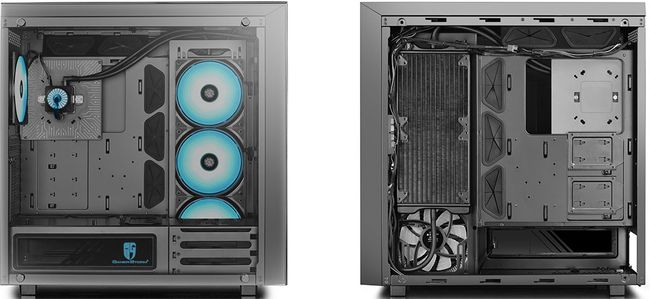


There is room to fit a second AIO cooler in the front, one with up to a 360mm radiator. Or you can populate the front with up to three 120mm fans.

DeepCool includes four RGB fans with the Ark 90—three 140mm fans attached to the liquid cooler, and another one more in the rear. In addition to the front fan mounts, you can install another three 120mm fans up top.

The case supports up to an E-ATX motherboard no bigger than 305mm x 276mm. For storage, it has three 3.5-inch drive bays and three 2.5-inch/3.5-inch bays.

Tempered glass panels cover the side, front, and top of the main section, with the side panel giving a view of your build. The case also comes with a riser cable to install your graphics card vertically, if you want. There is a little more room for long graphics cards if going that route—up to 400mm when mounting vertically, versus 310mm if sticking with a horizontal install.

The Ark 90 will be available next month for $300.

Nhận xét

Popular Posts

DeepCool launches frameless RGB fans that you can control over Wi-Fi

You can use your smartphone to adjust the speed and lighting of these fans.   Fans are not overly complicated for fancy devices. They have blades that spin and push (or pull) air, and some of them light up. DeepCool has taken things a step further, however, by designing frameless RGB smart fan set that hooks into your wireless network. DeepCool's new MF120 set comes with three fans and a controller for them to plug into to. Using a free app that is available for Android and iOS, you can then connect to the controller and cycle through five built-in lighting effects (dynamic, static, breathing, comet, and fashion collision) and 36 interchangeable lighting modes, and also adjust the speed. We're not sure there is a whole lot of utility for controlling your case's fans with your smartphone, but if that's something you want to do, there you go. The fans themselves are uniquely designed. They're frameless in the sense that they don't sit enclosed in a traditional fra...

How to Zip (and Unzip) Files on Windows 10

The ZIP file format reduces the size of files by compressing them, saving disk space, and reducing network transfer times. It also allows you to combine several files into a single one that's easy to share with others. Here's how to zip and unzip files on Windows 10. How to Create a Zip File (Compressed Folder) First, open File Explorer and locate the files or folders you'd like to compress and combine into a Zip file. Windows refers to a Zip file as a "compressed folder," so the terms are interchangeable in this case. We'll be using a group of image files as an example, but you can zip any type of file. If it's a single file or folder you'd like to compress, right-click it and a menu will pop up. Click "Send to," and then click "Compressed (Zipped) Folder." You can also select multiple files or folders in Explorer, and then follow the same steps above to compress them simultaneously. Windows compresses the fi...

Windows 10 Will Soon Show Edge Browser Tabs in Alt+Tab

Alt+Tab is useful for switching between windows, but it can't help you find that browser tab you had open in one of your windows. Soon, Windows 10 will show all your open Edge browser tabs alongside your windows. When this change is available, you can just use the new Microsoft Edge browser normally. When you Alt+Tab , all your browser tabs will appear as their own thumbnail—as if they were their own browser windows. Microsoft Don't like this? That's fine. Microsoft says you can disable it from Settings > System > Multitasking. You can also set it to only show your last three or five browser tabs so tab overload doesn't swamp your Alt+Tab switcher, too. This feature is just for Microsoft Edge right now, but we could easily see it coming to other web browsers. Edge is based on the same Chromium code that forms the basis for Chrome, for example—Google might enable this feature in Google Chrome, too. It's easy to see Mozilla Firefox taking advant...