Gmail Confidential Mode
One of the many features added to Gmail with its recent redesign was the Confidential Mode. It has been available on the web for quite some time, however, it is today that the feature has found its way to Android.Scroll Down for VideoIt allows senders to restrict things like forwarding, copying, and downloading the emails they send. Senders can also set emails to expire after a certain amount of time, and, in cases where extra security is necessary, lock a message with an SMS code.
Gmail for Android finally lets you send sensitive info via Confidential e-mails, without having to update the app.
How to Use Gmail Confidential Mode?
On Mobile Devices
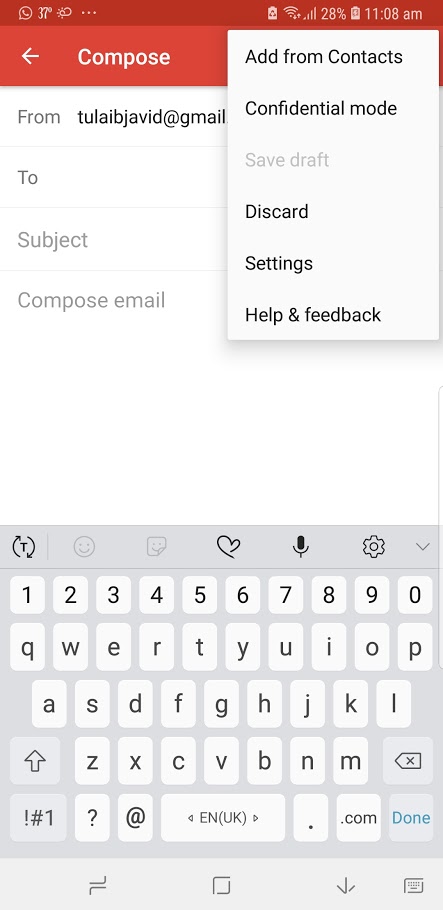
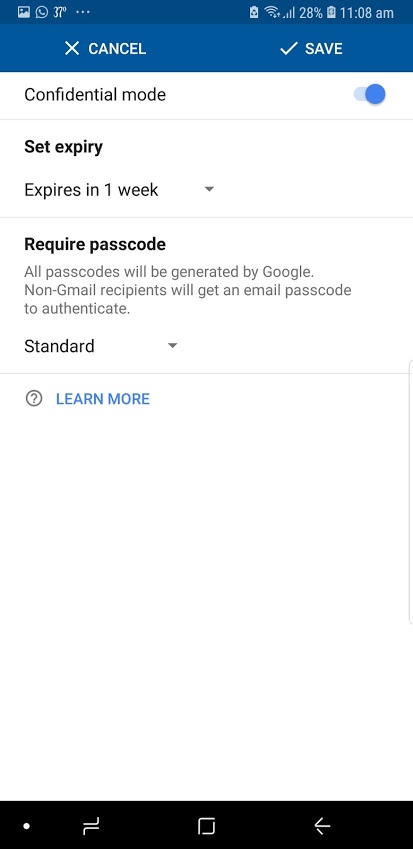
Implementing confidential mode is a fairly easy process that’s similar across both Android and iOS. All you need to do is begin composing a new email, tap the more icon (three vertical dots on Android or three horizontal dots on iOS), and then select “Confidential Mode” and turn the setting on. It’s then you’ll be asked to set things like expiration dates and SMS passcodes.Once you set the expiration date and passcode settings, you can simply write out the message and send it out right from your mobile device.
On PC/Laptops
To use it on a PC/Laptop, once you compose an email, you see a LOCK at the bottom. This will enable/disable Confidential Mode. Once you enable it, the rest of the settings are the same as stated above.
How to change the expiration of sent emails?
Even after you’ve set an expiration date for an email, you can remove access to it early. This is done by going into your Sent folder, opening the email in question, and tapping the “Remove Access” button that appears at the bottom.Pros of Gmail Confidential Mode
- It’s a handy tool if you’re sending information you’re afraid of leaking out or personal details that recipients should only need access to for a limited amount of time.
- If you send an email in confidential mode, any attachments that go along with it will be restricted as well. That means that recipient won’t be able to download any sensitive photos or documents you might send, so this will certainly have its uses for those in the business world as well.
Cons of Gmail Confidential Mode
- Confidential mode can’t prevent recipients from taking a screenshot of your email – and indeed, might not be able to prevent devices with malicious software from downloading the content of your email – it still offers a layer of protection when sending sensitive messages.
(Video) Gmail Confidential Mode
Via Slash Gear
READ NEXT: Track & Measure Website Success with Set Goals
Nhận xét
Đăng nhận xét