Chuyển đến nội dung chính

How to Identify Unknown Numbers on WhatsApp/Viber/Telegram/Line?

Identify Unknown Numbers on WhatsApp

I am sure you get WhatsApp Text/Photos/Videos and other media from unknown WhatsApp Senders. Wondering how to know the name of the sender? Here you are. Here I'll tell you two ways by which you can Identify Unknown Numbers on WhatsApp.

Scroll Down for Video

First Method

All you need to do is to open your WhatsApp. Locate the unknown sender. Click on it and again click on its Number (at the top). See below photo.
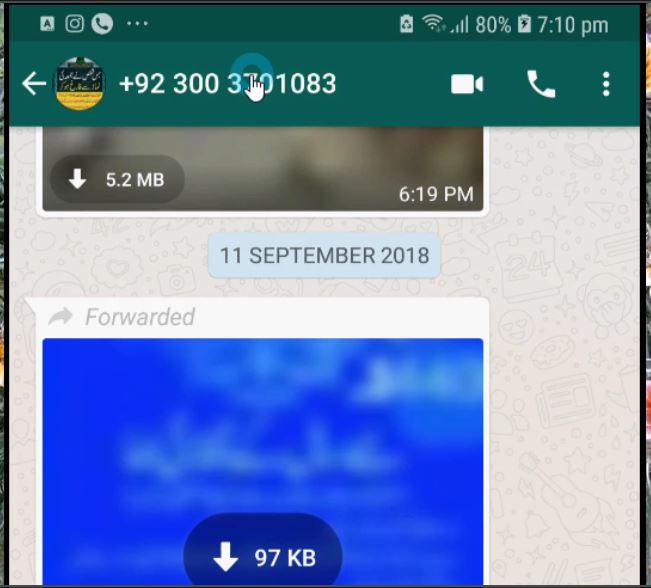
Identify Unknown WhatsApp Number
Image: Tech Urdu YouTube

Ok, once you click on the number, a new window opens. Now, below the number, you see some information about the sender (depends upon what the sender has set for himself/herself. Most often, the sender's name or his/her nickname will be visible here. As you can see in the image below.

Identify Unknown WhatsApp Number 1 
Image: Tech Urdu YouTube

SEE ALSO: Google Maps' LIVE Popular Times Feature Saves Your Time


Second Method

In case you’re a Truecaller user and want to auto-search unknown numbers on Truecaller, here’s how you go about it:

How to Auto-search on WhatsApp Using Truecaller

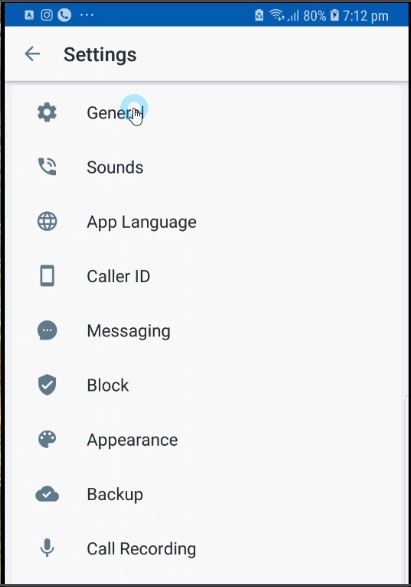
1. Open Truecaller, tap on the Hamburger Menu (on Top Left) and select ‘Settings’


Identify Unknown WhatsApp Number with True Caller App 
Image: Tech Urdu YouTube

2. Choose the ‘General’ option

Identify Unknown WhatsApp Number with True Caller App 1 
Image: Tech Urdu YouTube

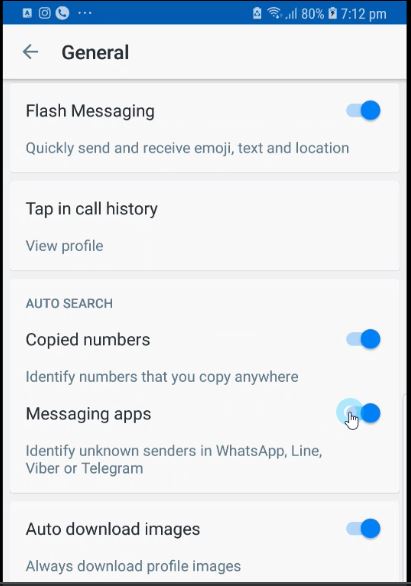
3. Toggle on ‘Messaging Apps’


Identify Unknown WhatsApp Number with True Caller App 2 
Image: Tech Urdu YouTube

That’s it! You’ll now be able to auto-search on messaging apps using Truecaller. The setting works on WhatsApp, Line, Viber, and Telegram.

TrueCaller (Free) Download Link

https://play.google.com/store/apps/details?id=com.truecaller

(Video) How to Identify Unknown Numbers on WhatsApp/Viber/Telegram/Line?


READ NEXT: How does GPS work on Phone?


Nhận xét

Popular Posts

Digital Finance Stakeholders

Digital forensic students looking to research digital finance may find this useful as a starting point. Through the financial support of the Bill & Melinda Gates Foundation, MicroSave isconducting a four-year research project in the following eight focus countries as part ofthe Agent Network Accelerator (ANA) Project: http://www.helix-institute.com/sites/default/files/Publications/161101%20ANA%

MSI wraps its newest mid-tower case in tinted tempered glass

This case will highlight (or expose) your cable management skills   As reported by PCGamer, MSI is rolling out a new Mag Pylon mid-tower case that it's positioning under its "Gaming Gear" umbrella of products. It has three tinted tempered glass panels—both sides and the front—to show off your build, and supports the company's Mystic Light Sync feature to synchronize lighting across other MSI products. The case comes with three 120mm RGB fans aligned in the front. You could swap them out for a pair of larger 140mm fans if you wanted to, and there is also room to install up to two 140mm or 120mm fans (or a liquid radiator and fans) in the top and a 120mm in rear. Cable management is a bit more important in a see-through case like this, unless you're a honey badger and just don't care what your build looks like. Assuming you do, you'll find four large cable cutouts to the right of the motherboard tray. There are also several cable tie downs on the back of th...